

Containers fit into DevOps delivery pipelines by packaging application code and all its dependencies into a single portable unit, eliminating environment configuration overhead at every pipeline stage. When combined with a CI/CD pipeline, containerization simplifies deployment from development through production and integrates naturally with orchestration platforms like Kubernetes. The result is a faster, more consistent DevOps delivery process with fewer environment-related errors and less manual intervention.
DevOps came to prominence to meet the ever-increasing market and consumer demand for tech applications. It aims to create a faster development environment without sacrificing the quality of software. DevOps also focuses on improving the overall quality of software in a rapid development lifecycle. It relies on a combination of multiple technologies, platforms, and tools to achieve all these goals.
Containerization is one technology that revolutionized how we develop, deploy, and manage applications. In this post, we will look at how containers fit into the DevOps world and the advantages or disadvantages offered by a container-based DevOps delivery pipeline.
(This article is part of our DevOps Guide. Use the right-hand menu to navigate.)
What is a containerized application?
A containerized application is a software package that bundles the application code and all its required dependencies into a single portable unit called a container. Containers share the host operating system kernel, making them lighter than virtual machines while remaining deployable across any supported infrastructure with minimal configuration.
Virtualization helped users to create virtual environments that share hardware resources. Containerization takes this abstraction a step further by sharing the operating system kernel.
This leads to lightweight and inherently portable objects (containers) that bundle the software code and all the required dependencies together. These containers can then be deployed on any supported infrastructure with minimal or no external configurations.
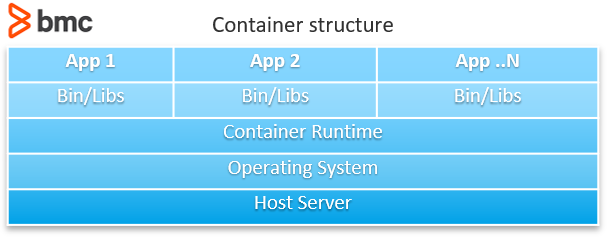
One of the most complex parts of a traditional deployment is configuring the deployment environment with all the dependencies and configurations. Containerized applications eliminate these configuration requirements because the container packages everything the application requires within the container itself.
On top of that, containers require fewer resources and can be more easily managed compared to virtual machines. Containerization leads to greatly simplified deployment strategies that can be easily automated and integrated into DevOps delivery pipelines. When combined with an orchestration platform like Kubernetes or Rancher, users can:
- Leverage the strengths of those platforms to manage the application throughout its lifecycle
- Provide greater availability, scalability, performance, and security
What is a continuous delivery pipeline?
A continuous delivery pipeline is an automated sequence of steps that moves software from development through testing and into production in a consistent, repeatable way. In DevOps, continuous delivery pipelines are typically combined with continuous integration to form CI/CD pipelines that automate the complete software development and release process.
DevOps relies on Continuous Delivery (CD) as the core process to manage software delivery. Continuous Delivery enables software development teams to deploy software more frequently while maintaining the stability and reliability of systems.
Continuous Delivery utilizes a stack of tools such as CI/CD platforms, testing tools, and automation to facilitate frequent software delivery. Automation plays a major role in these continuous delivery pipelines by automating all the possible tasks of the pipeline—from tests, infrastructure provisioning, and even deployments.
In most cases, Continuous Delivery is combined with Continuous Integration to create more robust delivery pipelines called CI/CD pipelines. CI/CD pipelines enable organizations to integrate the complete software development process into a DevOps pipeline:
- Continuous Integration ensures that all code changes are integrated into the delivery pipeline.
- Continuous Delivery ensures that new changes are properly tested and ultimately deployed in production.
Both are crucial for a successful DevOps delivery pipeline.
(Learn how to set up a CI/CD pipeline.)
How does it all come together?
Containerization and CI/CD pipelines work together by replacing environment-specific configuration steps with a single container build that travels unchanged through every pipeline stage—from development through staging to production. The key shift is that teams build the container once and deploy it anywhere, rather than provisioning and configuring environments at each stage.
Traditional DevOps pipeline
In a traditional delivery pipeline, the following steps are typical:
- Develop software and integrate new changes to a centralized repository (version control tools come into play here)
- Verify and validate code and merge changes
- Build the application with the new code changes
- Provision the test environment with all configurations and dependencies and deploy the application
- Carry out testing (both automated and manual depending on the requirement)
- Deploy the application in production (requiring resource provisioning and dependency configuration)
Most of these tasks can be automated using IaC tools such as Terraform and CloudFormation, and deployment can be simplified with platforms like AWS Elastic Beanstalk and Azure App Service. However, these automated tasks still require careful configuration and management, and using provider-specific tools creates vendor lock-in risk.
Containerized delivery pipeline
A containerized pipeline simplifies the same workflow with significantly less management overhead:
- Develop and integrate changes using a version control system
- Verify, validate, and merge code changes
- Build the container (the code repository contains the application code plus all configuration files and dependencies needed to build the container)
- Deploy the container to the staging environment
- Carry out application testing
- Deploy the same container to the production environment
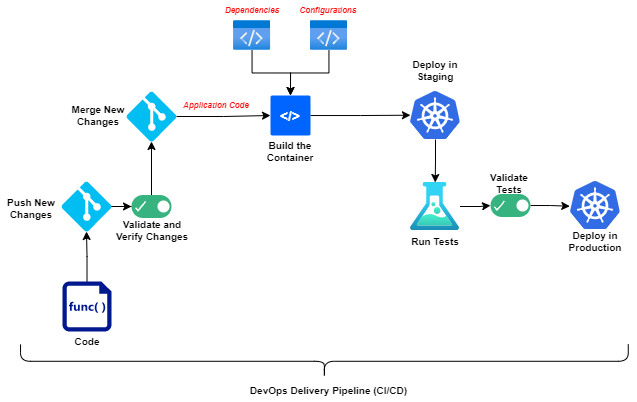
Container-based DevOps delivery pipeline
Containerized pipelines effectively eliminate most regular infrastructure and environment configuration requirements. The container deployment environment must still be configured beforehand—typically this means either a container orchestration platform like Kubernetes or Rancher, or a platform-specific orchestration service like Amazon Elastic Container Service (ECS), AWS Fargate, or Azure Container Services.
What is the key difference between traditional and containerized pipelines?
The key difference is what gets built: in a traditional pipeline, only the application is built; in a containerized pipeline, the complete container is built—bundling the application, all its dependencies, and its configurations into a single deployable unit that works in any supported environment.
This distinction has significant downstream effects on the delivery pipeline:
- Fewer configuration errors: The container carries all application dependencies and configurations, reducing environment-specific failures
- Faster environment transitions: Delivery teams can quickly move containers between staging and production without reconfiguration
- Narrower troubleshooting scope: Developers focus on the application within the container rather than chasing down external configuration or service issues
Modern application architectures such as microservices-based architectures are well suited for containerization as they decouple application functionality to different services. Containerization allows users to manage these services as separate individual entities without relying on any external configurations.
Containers do still carry infrastructure management requirements—the most prominent being managing both the:
- Container orchestration platforms
- External services like load balancers and firewalls
However, using a managed container orchestration platform like Amazon Elastic Kubernetes Service (EKS) or Azure Kubernetes Service (AKS) eliminates the need to manage the orchestration infrastructure directly. These managed platforms allow Kubernetes users to benefit from cloud scale without vendor lock-in, since both are based on the open Kubernetes standard.
(Determine when to use ECS vs AKS vs EKS.)
How does container orchestration fit into the DevOps delivery pipeline?
Container orchestration manages the complete lifecycle of containers within a DevOps pipeline—handling deployment, availability, scaling, and failure recovery automatically. Without orchestration, containerized pipelines would require manual intervention to manage the containers that CI/CD automation delivers.
Container orchestration goes hand in hand with containerized applications because containerization is only one part of the overall container revolution. Kubernetes is among the most popular orchestration platforms, with industry-wide support and the ability to power virtually any environment—from single-node clusters to multi-cloud clusters.
Orchestration platforms eliminate the need for manual container management while ensuring availability. Using a platform-agnostic solution like Kubernetes prevents vendor lock-in and allows teams to use managed solutions and power multi-cloud architectures with a single platform.
(Explore our multi-part Kubernetes Guide, including hands-on tutorials.)
Are containers right for your DevOps delivery pipeline?
For most teams, yes. Containerization benefits practically all application development scenarios, with the main exceptions being overly simple applications or legacy monolithic architectures that are not well-suited for containerization.
Containers help simplify the DevOps delivery process by allowing teams to leverage all the advantages of containerization within their delivery pipelines without disrupting core DevOps practices. Containers support any environment regardless of programming language, framework, or deployment strategy, while giving delivery teams more flexibility to customize their environments without affecting the delivery process itself.
Frequently asked questions
What is the difference between containerization and virtualization in DevOps?
Virtualization creates virtual machines that each include a full operating system, sharing only the underlying hardware. Containerization shares the host operating system kernel, making containers significantly lighter, faster to start, and more portable. In DevOps delivery pipelines, containers are preferred because they reduce resource overhead and integrate more cleanly with CI/CD automation tools.
Do containers work with CI/CD pipelines?
Yes. Containers integrate directly with CI/CD pipelines by replacing environment provisioning steps with a single container build. Once the container is built with its application code and dependencies, the same container image is deployed through staging and production without reconfiguration—making CI/CD pipelines faster and more consistent.
What container orchestration platforms are most commonly used in DevOps?
Kubernetes is the most widely adopted container orchestration platform in DevOps, supported across public clouds and on-premises environments. Managed Kubernetes services—such as Amazon EKS, Azure AKS, and Google GKE—remove infrastructure management overhead while preserving the open-source portability of Kubernetes. Other orchestration options include Amazon ECS and AWS Fargate for teams operating primarily within AWS.
What are the disadvantages of using containers in DevOps?
Containers are not well-suited to legacy monolithic applications or very simple workloads where the added complexity of containerization outweighs the benefit. Containers also introduce a learning curve around orchestration platform management and container security, including image vulnerability scanning and access control. Teams new to containers should plan for this operational overhead before migrating existing pipelines.
How do microservices and containers work together in DevOps?
Microservices architectures decompose applications into small, independently deployable services—a structure that maps naturally to containers, where each service can be packaged as its own container. This allows DevOps teams to build, test, deploy, and scale individual services independently without affecting the rest of the application. Container orchestration platforms like Kubernetes are commonly used to manage the lifecycle of all services in a microservices-based deployment.
Related reading
- BMC DevOps Blog
- What Is a Container Pipeline?
- How To Run MongoDB as a Docker Container
- Containers vs Microservices: What’s The Difference?
- GitHub, GitLab, Bitbucket & Azure DevOps: What’s The Difference?
The views and opinions expressed in this post are those of the author and do not necessarily reflect the official position of BMC.
These postings are my own and do not necessarily represent BMC's position, strategies, or opinion.
See an error or have a suggestion? Please let us know by emailing [email protected].